One workspace. Documents, study, and media.
Set like print. Spoken like a lecture. Kept like a secret.
Alethiea is a free collection of tools to create beautifully typeset PDFs, study from your own material, and turn notes into narrated videos. Files are handled in your browser, not uploaded.
01 · Text to PDF
A typesetter, not a print dialog.
Every other Markdown to PDF button is a print stylesheet in a trench coat. This one is a document engine written from scratch: its own parser, line breaker, pagination loop and maths layout. Fractions get a real rule. Delimiters grow to fit their contents. A table row that straddles a page break redraws its own edges.
Scripts are routed per run, not per block, so a line mixing English, Devanagari and Arabic keeps each in its own face, right to left included. Emoji are embedded as real images. Fonts are subset, then measured to prove the subset. If a writing system has a font, it typesets: the torture test walks fourteen scripts and counting.
When you would rather not mark it up by hand, AI Format takes plain prose plus an instruction. Say “box the key equation”, “tighten the leading” or “number the theorems”, and it applies real formatting markup, including LaTeX maths.
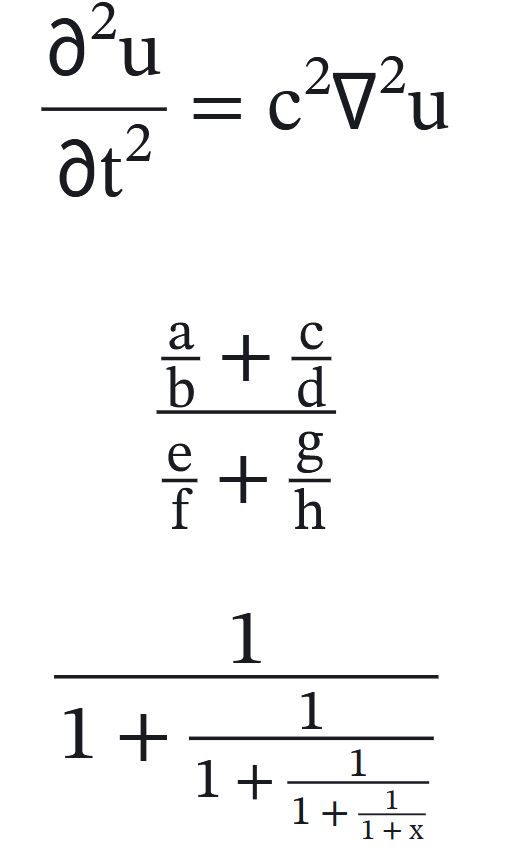
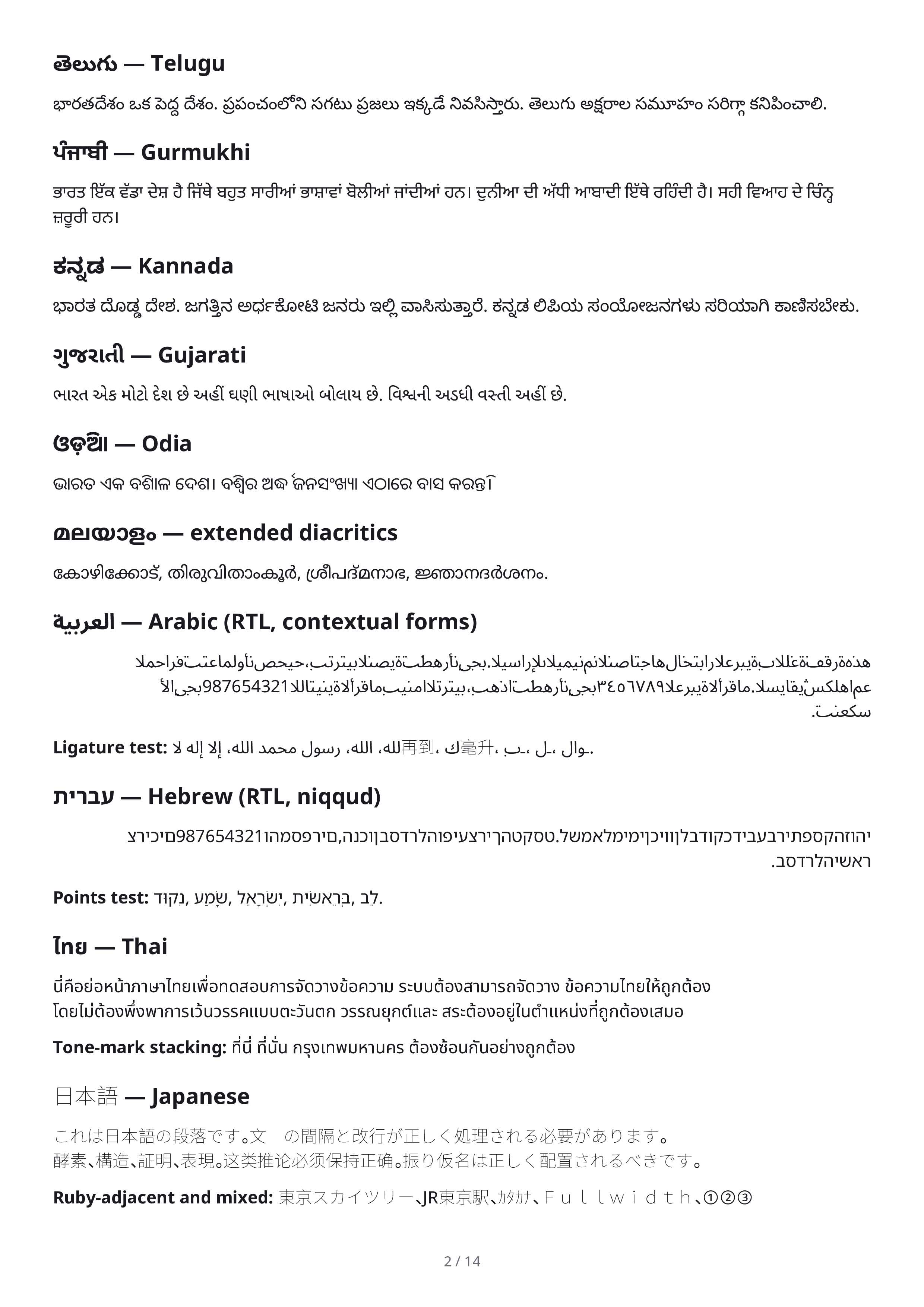
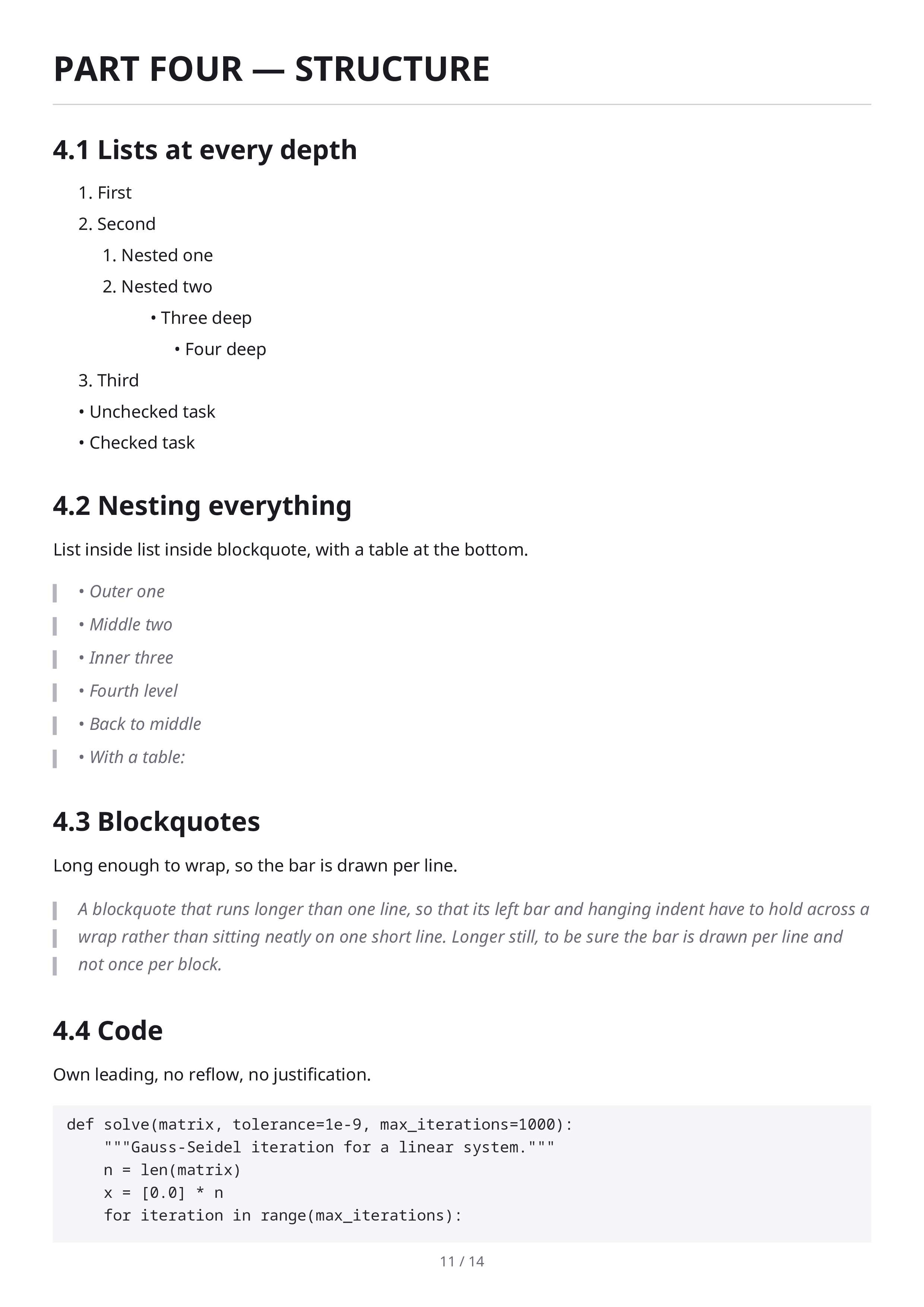
Figs. 1 to 3 are unretouched pages (5, 2 and 3 of 14) from the torture test, a document the engine must survive before every release. Click any page to inspect it full size.
02 · Praxis, the motion engine
Notes in. A narrated film out.
Give Praxis a topic, a PDF or your own notes and it drafts the lesson, draws the scenes, speaks the narration and records a captioned 1080p60 file. The whole production runs on your CPU, with no queue and no credits. Three neural voices run locally: Kokoro, Piper with 900+ speakers, and Chatterbox for cloning. None of them is a cloud API.
No AI provider configured? A deterministic offline planner still writes a complete, editable lesson, and the interface always labels which tier authored it. An offline draft can never masquerade as AI.
03 · LaTeX Studio, new
AI assistance over a real compiler.
Studio is a full editor for complete documents. The assistant restructures sections, writes preambles, formats theorems and hunts errors as real LaTeX. Then the local compiler settles the argument. The AI proposes; xelatex decides. What you see is what TeX produced, not a preview’s guess.
When a compile fails you get named failure blocks, the ten errors that actually bite in a browser, instead of a 4,000 line log.
“Tighten §3 into a formal theorem,
box the result, and number
the equations.”
Theorem 3.1 (Convergence). Every Cauchy sequence in ℝ converges.
xn → x, |xn − x| < ε for n ≥ N(ε)(3.1)
Proof. By completeness of ℝ. ∎
Illustrative. The assistant edits real LaTeX; the page is compiled by the local engine.
04 · All tools
Everything else, in plain text.
All of it is free, and every entry below is a straight link into the app.
Documents & PDF
LaTeX to PDFLaTeX StudioText to PDFPDF editorMergeSplitReorderReverseDual pageWord to PDFImages to PDFWatermarkUnlockCompress
05 · Privacy
Your files are opened in your browser, not on a server.
The document, PDF, image, audio and video tools read your file into this tab, transform it, and hand it back as a download. Your work is saved to the Local Library on your own device, and the backup is yours to keep.
Two features use the network, and only when you ask them to. AI sends
the text you give it to the provider you configured, and that provider can see the text
and the fact that you used the feature. Point Alethiea at a local model such as
Ollama and it never leaves your machine. Link import asks Alethiea’s own
relay at /api/fetch for a pasted YouTube, Wikipedia or DuckDuckGo page,
because browser rules forbid reading it directly; the relay stores nothing and can only
reach public content hosts.
No account is needed, and nothing here is paid. If that, or how the site is operated, changes, this page will say so rather than leaving an old promise standing.
06 · FAQ
Reasonable doubts, answered briefly.
No. The document, PDF, media and study tools run in this tab: your file is read into memory, transformed, and handed back as a download. Two things do leave the browser, and only when you use them. An AI feature sends the text you give it to the provider you chose, so that provider can see it , a local model keeps it on your machine. A pasted YouTube, Wikipedia or DuckDuckGo link is fetched through Alethiea’s own relay, because browser rules block reading it directly.
Open any tool →A real compiler: TeX Live 2025’s xelatex compiled to WebAssembly, 672 packages bundled, with refs and citations resolved by automatic reruns. A renderer cannot do that, because it never runs a second pass.
Try the compiler →A print dialog reflows HTML through a stylesheet. Alethiea’s engine is written from scratch: its own parser, line breaker, pagination loop and maths layout. That is why the specimen pages above exist at all.
Open the typesetter →No. Rendering and narration run on your CPU. With no AI provider configured, a deterministic offline planner still drafts complete, editable lessons, always labeled as such.
Open Praxis →In your browser’s Local Library, backed by IndexedDB on your device and exportable as JSON. It is the only copy, so keep a backup. Clearing your browser data clears the library.
Open the Library →The app is responsive and runs on tablets. The LaTeX compiler and long video exports want a desktop to be comfortable.
Open the app →